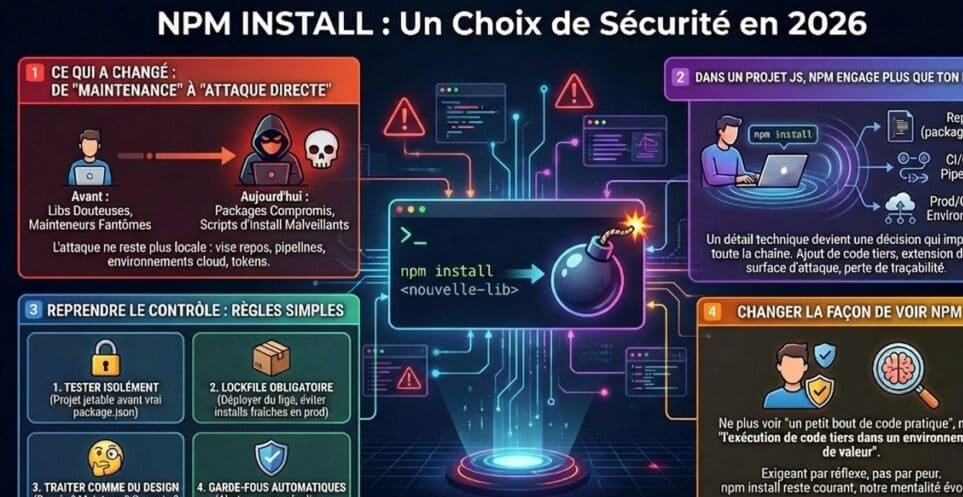
In 2026, npm install is no longer just a command: it runs third-party code on a machine that holds valuable access. Since September 2025, packages downloaded billions of times a week have been compromised, worms have stolen tokens to republish themselves, and the most widely used HTTP library in the ecosystem shipped a trojan for a few hours. npm, pnpm and Yarn responded by changing their defaults. Here is what happened, what changed, and the seven settings we apply on our JavaScript and TypeScript projects.
What actually happened since 2025
September 8, 2025: chalk, debug and 16 other packages. A widely followed maintainer received a fake “two-factor authentication update” email sent from the npmjs.help domain. The attacker captured his credentials and a one-time code, then within minutes published poisoned versions of 18 packages, including chalk and debug, which together account for about two billion downloads a week. The injected code hijacked cryptocurrency transactions in the browser. The versions were removed within hours, but any “fresh” install during that window picked them up.
Mid-September 2025: Shai-Hulud, the first npm worm. Starting September 15, malicious code delivered through a postinstall script stole the npm, GitHub and cloud tokens present on the machine, then automatically republished infected versions of every package the victim could publish. CISA’s alert on September 23 reported more than 500 compromised packages.
November 24, 2025: Shai-Hulud 2.0. A second wave used a preinstall script, which runs before installation even completes. Around 800 packages were affected and more than 25,000 GitHub repositories received stolen secrets.
March 31, 2026: axios. The npm account of axios’s lead maintainer was compromised. Two versions (1.14.1 and 0.30.4) were published with a stolen token, outside the usual pipeline. The axios code itself didn’t change: only package.json added a dependency, plain-crypto-js, whose postinstall script installed a trojan on macOS, Windows and Linux. The versions stayed online for about three hours.
June 2026: Red Hat packages. According to Red Hat’s bulletin, a GitHub account compromised through a malicious VS Code extension was used to inject code into packages published under the @redhat-cloud-services scope.
The common threads are clear: a compromised maintainer account or token, a script that runs at install time, secrets stolen from laptops and CI, and an exposure window of a few hours.
What changed in the tooling
- npm tokens: since December 9, 2025, “classic” tokens are revoked. Write tokens have a limited lifetime, two-factor authentication is required by default and
npm loginopens a two-hour session. - Trusted publishing: a GitHub Actions or GitLab CI pipeline can publish without a stored token, through OIDC, and the package’s provenance is attested.
- npm v12 (July 2026): dependency install scripts no longer run without explicit approval, and Git or remote URL dependencies are refused by default.
- Minimum release age: npm (since 11.10,
min-release-age, in days), pnpm (minimumReleaseAge, in minutes, one day by default since pnpm 11) and Yarn (npmMinimalAgeGate) can refuse versions that are too recent.
These protections only help if they are switched on and the tools are up to date. The axios incident shows it: trusted publishing was in place, but the attacker published manually with a token that was still valid.
Seven concrete settings
1. Install from the lockfile
In continuous integration and for production builds, npm ci installs exactly the versions in package-lock.json and fails if it is out of sync with package.json.
npm ciThe lockfile gets reviewed in code review, just like application code.
2. Block install scripts
With npm v12, this is the default. You explicitly approve only the packages that need scripts (native compilers, for example), and the list is saved in package.json:
# list packages whose scripts were blocked
npm approve-scripts --allow-scripts-pending

# explicitly approve one package
npm approve-scripts esbuild
On npm 11, the equivalent setting goes in the project’s .npmrc:
ignore-scripts=truepnpm also blocks dependency scripts by default; the allowlist is declared with allowBuilds in pnpm-workspace.yaml.
3. Enforce a minimum release age
Most malicious versions are detected and removed within hours. Refusing versions younger than a few days keeps them out.
# .npmrc (npm 11.10 or later): delay in days
min-release-age=3
# pnpm-workspace.yaml: delay in minutes
minimumReleaseAge: 4320
minimumReleaseAgeExclude:
- '@your-org/*'# .yarnrc.yml (Yarn 4): delay in minutes
npmMinimalAgeGate: 4320For an urgent security fix, make a targeted, documented exception rather than a global switch-off. Also set the same delay in Dependabot or Renovate, otherwise they will open updates that the install step refuses.
4. Verify signatures and provenance
npm audit signaturesThe command checks registry signatures and provenance attestations for installed packages. A version of a package usually published with provenance that arrives without it, as with axios in March 2026, should raise a flag.
5. Publish without a stored token
If you publish packages, switch to trusted publishing. In GitHub Actions, the job only needs the OIDC permission:
permissions:
  contents: read
  id-token: write

steps:
  - uses: actions/checkout@v7
  - uses: actions/setup-node@v7
    with:
      node-version: 24
      registry-url: https://registry.npmjs.org
  - run: npm ci
  - run: npm publish
You then declare the package and the authorized repository in the package settings on npmjs.com. Delete old publish tokens.
6. Audit continuously
npm audit --audit-level=highRun the audit in continuous integration, turn on your forge’s security alerts (GitHub, GitLab) and automate updates with human review.
7. Limit the secrets exposed at install time
No long-lived tokens on laptops, CI secrets scoped to the job that needs them, ephemeral runners. And if a compromised version got through, a quick lockfile check like the one recommended after the axios incident:
grep -E "axios@(1\.14\.1|0\.30\.4)|plain-crypto-js" package-lock.jsonIf the search returns anything, treat the machine as compromised: rotate every secret it had access to.
Adding a dependency is an architecture decision
Technical settings don’t replace judgment. Before adding a dependency, ask four questions:
- Duplicate? Is an equivalent library already in the project?
- Maintenance? Is the repository active, are vulnerabilities fixed, are the maintainers identified?
- Installation? Does the package run scripts, and why?
- Scope? Would a few lines of in-house code do the job?
Trying out a new library happens in a separate project, with no secrets. It only goes into the real package.json once the need is confirmed.
One last point, new in 2026: AI coding agents install packages too. The same rules apply to them, with even stricter permissions.
Where to start
If you have a JavaScript or TypeScript repository with dozens of dependencies, critical CI/CD pipelines or a cloud production environment where everything goes through npm:
- update npm, pnpm or Yarn and turn on the minimum release age;
- switch CI to
npm ciwith scripts blocked by default; - inventory the tokens and secrets reachable at install time, and reduce them.
At Etixio, these settings are part of our engineering standard: systematic code review (lockfile included), automated tests, continuous integration, secrets management, separate environments. We set them up in your repositories and your tools, with your rules.
Want to review your dependencies and your build chain? We can start with a technical audit or make it part of a cybersecurity and compliance program. Let’s talk.
FAQ
Why is npm install a security risk?
Because it downloads and, depending on configuration, runs third-party code on the machine that launches it: developer laptop, CI server, production image. Install scripts (preinstall, postinstall) can read environment variables, SSH keys or any tokens present. That is how the Shai-Hulud attacks worked in 2025 and how the axios compromise worked in 2026.
What is the difference between npm install and npm ci?
npm install resolves versions from package.json and may update the lockfile. npm ci installs exactly the versions in package-lock.json, fails if it is out of sync with package.json, and starts from an empty node_modules folder. In continuous integration and for production builds, use npm ci.
What is a minimum release age?
It is a setting that refuses to install a version published less than N days ago (npm, min-release-age) or N minutes ago (pnpm, minimumReleaseAge; Yarn, npmMinimalAgeGate). Malicious versions are usually detected and removed within hours: a delay of one to a few days avoids most of them. pnpm 11 applies a one-day delay by default.
Does npm v12 block install scripts?
Yes. Since npm v12 (July 2026), dependency install scripts no longer run without explicit approval, and Git or remote URL dependencies are refused by default. You approve the packages that need them with npm approve-scripts, and the list is saved in package.json.
What should you do if a compromised dependency was installed?
Treat the machine as compromised: isolate the laptop or runner, revoke and rotate every secret it could reach (npm and GitHub tokens, cloud keys, SSH keys), check repositories and packages published with those credentials, then reinstall from a clean lockfile. Removing the package is not enough.